
Switching Views
Most agents only ever see one sidebar — My Epique — and that's all they need. But if you also wear a leadership hat at Epique (you lead a team, you run a brokerage, or you oversee an area), the app gives you extra sidebars you can switch into without leaving your account.
What’s a view?
A view is a complete sidebar layout, tuned for what you’re trying to do. Think of it like switching between rooms in the same house — the house is your account, the rooms are your responsibilities. Each view shows pages and data that are scoped to that role:
My Epique — your personal agent dashboard, transactions, and benefits. Everyone has this one.
My Team — appears if you’re on a team. Lets you see members, leaderboard, revenue, and team-wide analytics. See the My Team space.
Broker — appears if you’re a broker. Same shape as My Team but scoped to every agent under your brokerage. See the Broker space.
Area Leader — appears if you lead an area. Same shape, scoped to every agent in your area. See the Area Leader space.
How to switch
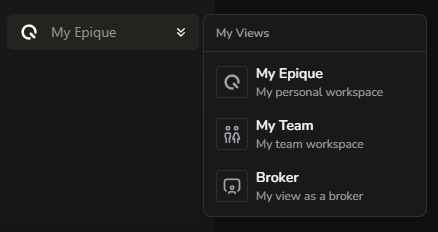
Click the badge at the top of the sidebar (your current view’s name).
A small menu opens labelled My Views, listing every view you have access to with a short description under each.
Click the one you want. The sidebar swaps out, and you’re taken to that view’s first page.
Your selection is remembered on this browser, so as you click around within a view you stay in that view. If you sign in from a different browser or device, you’ll start in My Epique and can switch from there.
The first time you see it
If you’ve just been added to a team or had a broker role applied, you’ll get a friendly little spotlight popup the first time you sign in pointing out that the view switcher is now interactive. Click Got it to dismiss it. You can always reopen the dropdown by clicking the badge.
Switching views doesn’t change your data, your transactions, your stocks, or anything else. It only changes which sidebar (and therefore which set of pages) you’re looking at. You can move between views as often as you like.